

Everyone uses it their own way, and nobody can say what it saved
Hey, I'm Wallace Darling (most people call me Wally). I run Darling Financial Group (darling-fg.com). I work with people earning $500k+ and business owners with $1M+ in revenue on the tax strategy that sits beyond the return, and I partner with CPA firms on that strategy layer so their clients get it without ever leaving the firm.
- Set up
- One afternoon in November
- You need
- A Claude Team plan and your tax software's exports
- You get
- Ten workflows, each with a prompt, a check and a reviewer
- Measure
- Hours per return, before and after
Most firm owners already know AI can handle a big chunk of tax season. What they don't have is a way to roll it out, so one person uses it their own way, everyone else keeps keying 1099s by hand, and nobody can say whether it's saving a single hour.
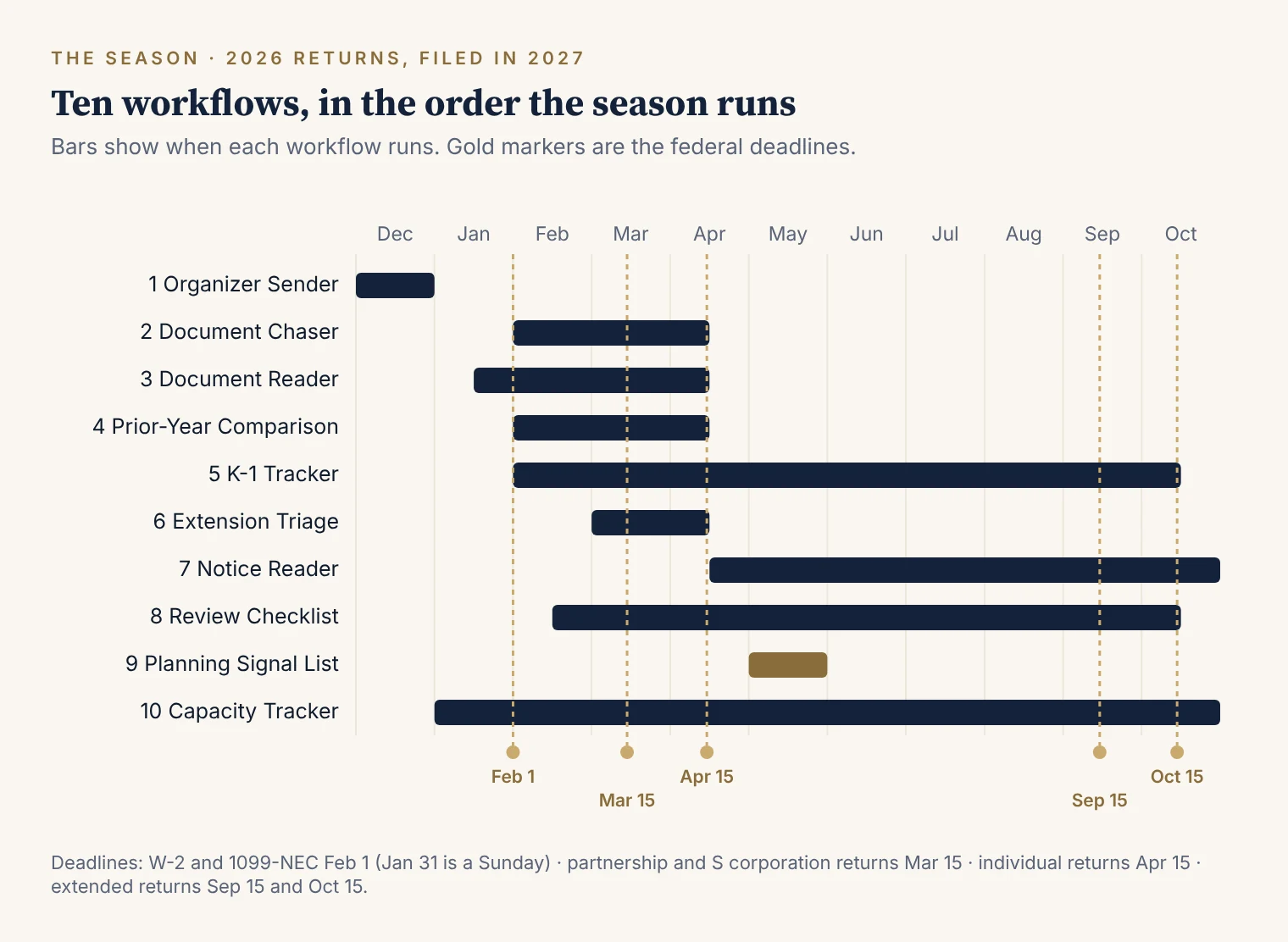
So I wrote one workflow for each stage of the season, in the order the season runs. Every one sets out who runs it, who reviews it, what client data can go in and what comes back, then gives you the prompt, the check before you move on and where it goes wrong. Nobody on the team gets replaced. The same people take on more returns, and the hours your seniors spend ticking off 1099s go on planning work you can bill for.
Set it up once, before the first organizer goes out
Do this in November. Once the season starts, nobody has an afternoon.
The plan
Use Claude Team or Enterprise for client work, so it sits under business terms, isn't used to train Claude's models, and the firm controls who has access. Check current plans and prices at claude.com/pricing. Turn on file creation, because several workflows hand back an Excel file or a Word letter.
- Open Settings (on Team and Enterprise, the owner opens Organization settings).
- Select Capabilities.
- Turn on Code execution and file creation.
One project per workflow
Make a Claude project for each workflow you roll out, and paste the workflow's standing instructions into the project instructions. Then everyone runs the same steps the same way, and the reviewer knows what to expect. Name them with a number, so they sort in season order: 01 Organizer Sender, 02 Document Chaser and so on.
- In Claude, select Projects.
- Select New project.
- Name the project, for example
03 Document Reader. - Paste the standing instructions from the workflow into the project instructions.
- Add the firm's templates to the project files: letters, checklists, the organizer.
- On Team, share the project with the people in the workflow's "Who runs it" row.
The data rule
Every workflow card says which tier of client data can go in. Write the rule down once, put it in the firm's WISP, and make it the first line of every project's instructions.
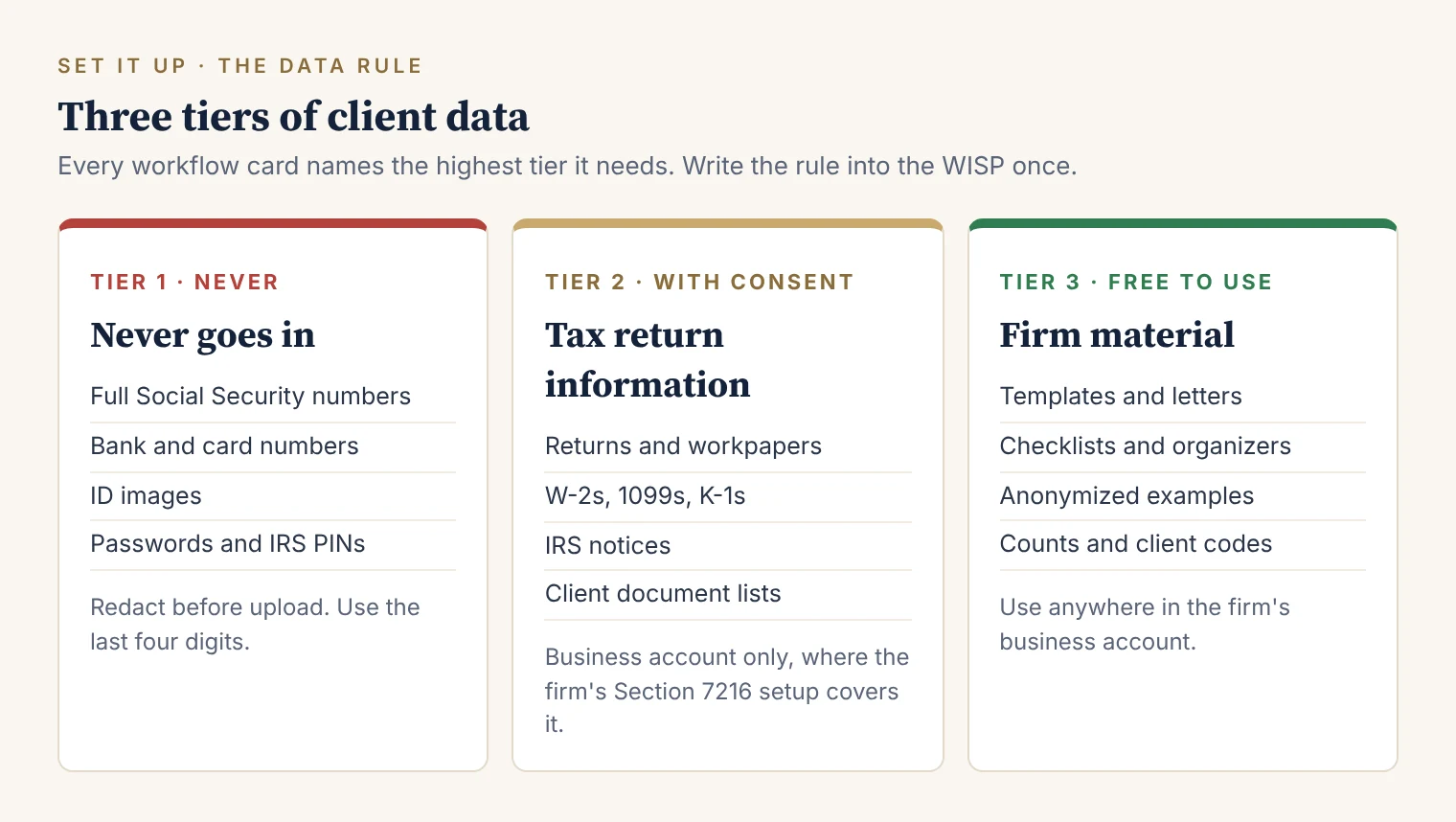
| Tier | What it covers | Rule |
|---|---|---|
| Tier 1: never | Full Social Security numbers, bank and card numbers, ID images, passwords, IRS PINs | Never goes into any AI tool. Redact it before upload, or use the last four digits. |
| Tier 2: with consent | Tax return information: the return, the source documents, the workpapers, IRS notices | Only in the firm's business account, only where the firm's Section 7216 setup covers it, and only by the people on the workflow. |
| Tier 3: free to use | Firm templates, checklists, anonymized examples, counts and codes | Use it anywhere in the firm's business account. |
Section 7216. A return preparer generally needs the client's written consent before using or disclosing tax return information for purposes other than preparing the return (26 CFR 301.7216-3). Some of these workflows prepare the return. Some, like the planning signal list, go beyond it. Take the question of which is which to the firm's adviser before the season, not during it, and write the answer into the engagement letter.
Who does what
| Role | Runs | Reviews |
|---|---|---|
| Admin | 1 Organizer Sender, 2 Document Chaser | Nothing on its own |
| Staff accountant | 3 Document Reader, 4 Prior-Year Comparison | Nothing on its own |
| Senior | 5 K-1 Tracker, 6 Extension Triage, 7 Notice Reader | 3 and 4 |
| Manager | 8 Review Checklist, 10 Capacity Tracker | 5, 6 and 7 |
| Partner | 9 Planning Signal List | 8, 9, and anything that goes to the IRS |
Smaller firms merge roles. Keep one rule whatever the size: the person who runs a workflow is never the only person who reviews it.
The Organizer Sender
| At a glance | |
|---|---|
| When | December, before the holidays |
| Who runs it | Admin |
| Who reviews it | Manager, on a sample of five |
| Client data that can go in | Tier 3 for the letters. Tier 2 only for the client list with return types |
| What comes back | An engagement letter, a Section 7216 consent and the right organizer for each client, ready to send |
The season starts late when the organizer goes out in February. This one sends the engagement letter, the consent and the organizer together, matched to what each client filed last year.
The attached list is last year's clients, by client code, with the forms we filed for each (1040, Schedule C, Schedule E, 1120-S, 1065, state returns) and the fee.

For each client:
1. Pick the organizer version from the project files: individual, individual with business, individual with rentals, or business entity.
2. Pick the engagement letter template that matches the return types.
3. Note anything that changed last year that the letter or organizer must cover: a new state, a new entity, a K-1 that arrived late, a return we extended.
4. Flag any client with no signed Section 7216 consent on file.

Give me one table: client code, organizer, letter, notes, consent status.
Do not write to any client. Do not invent a fee change.
Check it
- Open five rows at random. Compare each with last year's return.
- Confirm every client with an extension last year has a note.
- Send only after the manager signs off the sample.
The Document Chaser
| At a glance | |
|---|---|
| When | Every Monday, February to April |
| Who runs it | Admin |
| Who reviews it | Senior, for the first round of each client |
| Client data that can go in | Tier 2: last year's document list and this year's portal index, by client code |
| What comes back | A missing-documents list per client and the reminder email in the firm's tone |
Last year's return is the best checklist you have. Every W-2, 1099 and K-1 that was there last year should turn up again, or someone should know why it didn't.
For client [CODE]:
- Last year's document list is attached (payer and form type for every source document we used).
- This year's portal index is attached (file names and dates received).

1. Match this year's documents to last year's, payer by payer.
2. List what is missing. For each item: payer, form type, and whether it usually arrives late (K-1s, corrected 1099s).
3. List anything new this year that wasn't there last year.
4. Draft a short reminder email in the firm's tone from the project files. Name each missing document by payer and form. Do not list documents we already have.

If a file name does not tell you the payer, say so. Do not guess.
Check it
- Compare the missing list with the portal for one client each week.
- Read the email before it goes. Check every payer name.
The Document Reader
| At a glance | |
|---|---|
| When | As documents arrive |
| Who runs it | Staff accountant |
| Who reviews it | Senior, on every flagged document and a sample of the rest |
| Client data that can go in | Tier 2, with Social Security numbers and account numbers redacted (Tier 1) |
| What comes back | A table of every box on every form, with a flag on anything it couldn't read |
This is the hours. Keying W-2s, 1099s, 1098s and K-1s into a worksheet is the most repeated job in the season, and the one where a tired person transposes two digits.
You read US tax source documents for a CPA firm: W-2, 1099-INT, 1099-DIV, 1099-B, 1099-NEC, 1099-MISC, 1099-R, 1098, 1098-T, Schedule K-1 (1065, 1120-S, 1041).

For every document:
- Record the form type, the payer or issuer, the tax year and every box with a value, box by box, exactly as printed.
- If the form is marked CORRECTED, say so on its own line.
- If a box is unreadable, blurred, cut off or handwritten, write UNREADABLE for that box. Never estimate a number.
- If the tax year is not the year we are preparing, flag it.
- For consolidated brokerage statements, record the summary totals and list the pages you read.

Output one row per box: client code, form, payer, box number, box label, amount, flag.
Data rule: if you see a full Social Security number or account number, do not repeat it. Write REDACT and tell me which page.
Check it
- Open every row with a flag and read the box on the source document yourself.
- For each client, add up wages and withholding from the table. Compare the totals with the documents.
- Check one random box on every third document.
The Prior-Year Comparison
| At a glance | |
|---|---|
| When | When the draft return is ready |
| Who runs it | Staff accountant |
| Who reviews it | Senior |
| Client data that can go in | Tier 2: this year's draft and last year's return, by client code |
| What comes back | A line-by-line comparison and a list of every swing over your threshold |
The 1099 that disappeared is the one the IRS notices later. This compares the draft with last year line by line, before a reviewer spends time on it.
Compare this year's draft return for [CODE] with last year's return, both attached.

1. Line by line: last year, this year, change in dollars, change in percent.
2. Flag every line that changed by more than [THRESHOLD] dollars or [PERCENT] percent.
3. List every income source (payer or schedule) on last year's return that is missing this year.
4. List every new income source.
5. Check estimated payments claimed against the payments in the client file.

For each flag, write one question the preparer should be able to answer before review.
Do not explain the changes yourself. List them.
Check it
- The preparer answers every question on the list in the workpapers.
- The senior reads the answers before reviewing the return.
The K-1 Tracker
| At a glance | |
|---|---|
| When | Weekly from February to the extension deadlines |
| Who runs it | Senior |
| Who reviews it | Manager |
| Client data that can go in | Tier 2: client codes, entity names and the date each K-1 arrived last year |
| What comes back | Who's waiting on which K-1, when it's expected, and which returns it will push past the deadline |
Most late returns are late for one reason: a K-1 that hasn't arrived. Last year's arrival dates tell you which ones to expect late, so the extension conversation happens in February, not on April 14.
Attached: every client who received a K-1 last year, with the issuing entity and the date the K-1 arrived; and the K-1s received so far this year.

1. Build one table: client code, entity, received this year (yes or no), date it arrived last year, expected this year.
2. Expected this year = last year's arrival date, moved to the same weekday this year. If last year's arrived after March 15, mark it LIKELY LATE.
3. For each client, the latest expected K-1 decides when the return can be finished. Sort by that date.
4. List every client whose return can't be finished before April 15 on these dates.

Give me the table and the list. Do not contact anyone.The Extension Triage
| At a glance | |
|---|---|
| When | First week of March, then weekly |
| Who runs it | Senior |
| Who reviews it | Manager, then the partner for any payment over your threshold |
| Client data that can go in | Tier 2: the status list, last year's tax and this year's payments, by client code |
| What comes back | Which returns won't make April 15, the payment to send with each extension, and the email to the client |
An extension extends the time to file, not the time to pay. Form 4868 moves an individual return to October 15, but tax owed is still due on April 15, so every extension needs a payment estimate and a client who knows about it.
Attached: the return status list (client code, documents complete yes or no, K-1 expected date from the K-1 tracker, preparer, review status), last year's total tax, and this year's estimates and withholding so far.

1. List every return that will not be filed by April 15 on the current status. Give the reason in one phrase.
2. For each one, estimate the balance due: last year's total tax, adjusted for anything the file already shows changed this year, minus payments so far. Show the working.
3. Mark each estimate HIGH, MEDIUM or LOW confidence, and say why.
4. Draft the client email: why we are extending, what they need to send, and the payment to make by April 15 with the amount.

Do not file or send anything. List anything you assumed.
Check it
- The manager reads every LOW confidence estimate.
- The partner approves any payment estimate over the firm's threshold.
- Check each email's amount against the working before it goes.
The Notice Reader
| At a glance | |
|---|---|
| When | Whenever an IRS notice arrives |
| Who runs it | Senior |
| Who reviews it | Manager, and the partner before anything goes to the IRS |
| Client data that can go in | Tier 2: the notice and the return as filed, with identifying numbers redacted |
| What comes back | What the notice says, whether the IRS is right, the response letter and the client email |
A CP2000 proposes changes to a return when the income or payments reported to the IRS don't match it. Most of them are a missing 1099, a cost basis that wasn't reported, or a payment applied to the wrong year. Reading one against the return is mechanical, so let Claude do the first pass. A person decides what goes back.
Attached: an IRS notice for [CODE] and the return as filed for the same year.

1. What type of notice is it, what year, and what is the response date printed on it?
2. List each change the IRS proposes, with the amount, and find the matching line on the return.
3. For each change: does the return already include it (for example under a different payer name or on a consolidated statement)? Say AGREE, DISAGREE or NEED DOCUMENTS, and why.
4. Draft the response letter for each DISAGREE item, citing the return line and the document.
5. Draft a short client email: what the notice is, what we think, what we need from them, and the date.

Do not tell the client what they owe until a person has reviewed this.The Review Checklist
| At a glance | |
|---|---|
| When | Before anything is filed or sent |
| Who runs it | Manager |
| Who reviews it | Partner signs |
| Client data that can go in | Tier 2: the return, the workpapers and the outputs of workflows 3, 4 and 6 |
| What comes back | A completed checklist with every item ticked, explained or sent back |
This is the workflow that keeps the rest safe. Claude prepares the checklist from the file. A person ticks it, and nothing goes out with an open item.
Prepare the review checklist for [CODE] from the attached return, workpapers, document table (workflow 3) and prior-year comparison (workflow 4).

For each item, write DONE, OPEN or N/A, and cite the page or row:
1. Every source document in the document table is on the return.
2. Every flag from the document table has a note from the preparer.
3. Every question from the prior-year comparison has an answer.
4. Estimated payments claimed match the payments in the file.
5. Dependents, filing status and address match last year or the change is explained.
6. State returns match the federal return where they should.
7. Any extension payment made is claimed.
8. The client's Section 7216 consent is on file if any workflow used their information beyond preparing the return.

List the OPEN items first. Do not mark anything DONE that you cannot cite.The Planning Signal List
| At a glance | |
|---|---|
| When | After each return is prepared, and in a batch in May |
| Who runs it | Partner, or a manager the partner names |
| Who reviews it | Partner |
| Client data that can go in | Tier 3 where you can: codes and counts from a tax software export. Tier 2 only with the consent your adviser says this use needs |
| What comes back | A list of clients whose returns show planning work, by signal, with a rough fee |
Your team sees the planning signals every year while they prepare the return, and most of them never become a conversation. This turns the season's returns into next season's planning list.
| Signal on the return | The conversation it starts |
|---|---|
| S corporation owner, salary unchanged for three or more years | Whether the salary still holds up as reasonable compensation, and the split between salary and distributions |
| Pass-through owner in a state with a PTET election, no election made | Whether electing would cut the client's federal tax |
| Owner profit over $400,000, no plan beyond a 401(k) | Whether a cash balance plan fits |
| Rental on straight-line depreciation, no cost segregation study | Whether a study would move deductions forward |
| Capital gain over $250,000 | Timing, harvesting and where the next sale lands |
| Equity compensation | When to exercise or sell, and what the next grant does to the year |
| Business sale planned within three years | Entity, timing and structure before the sale, not after |
Attached: an export from our tax software with client codes and the fields listed below. No names.

Fields: entity type, owner salary for the last three years, state, PTET election (yes or no), ordinary business income, retirement plan type, rental depreciation method, capital gains, equity compensation (yes or no), sale planned (yes or no from our notes).

1. Apply these thresholds: [FIRM THRESHOLDS].
2. For each signal, list the client codes that meet it.
3. Count unique clients across all signals.
4. At our planning fee of $[FEE], what is the total?

Give me the counts and the codes. Do not suggest a strategy for any client: a signal means a conversation is worth having, not that a strategy applies.The Capacity Tracker
| At a glance | |
|---|---|
| When | Baseline in January, then monthly |
| Who runs it | Manager |
| Who reviews it | Partner |
| Client data that can go in | Tier 3: hours by return type and by workflow, no client data |
| What comes back | Hours per return before and after each workflow, and how many more returns the same team can take |
Most AI adoption in firms has never been measured. People feel faster and nobody wrote down the before number. This is the before number.
| Return type | Hours per return, last season | Hours per return, this season | Returns this season | Hours saved |
|---|---|---|---|---|
| 1040, wages and investments | ||||
| 1040 with Schedule C or E | ||||
| 1120-S | ||||
| 1065 |
Attached: hours per return by return type for last season and this season so far, from our time records, and the number of returns of each type.

1. Hours saved by return type, and in total.
2. Which workflow each saving most likely came from, using the workflow log attached (which workflows ran on which return types).
3. At this season's hours per return, how many more returns of each type the same team could take next season, with the same hours available.
4. Where hours went up, say so.

Show the working. Do not round before the final line.
Fill the "last season" column in January, before the first workflow runs. Without it, the season ends with a feeling instead of a number.
Rolling it out without stalling the season
Don't start all ten in February. Start with the ones that run before the pressure does, and add the rest as each one proves itself.
| When | What to do |
|---|---|
| November | Plan, file creation, the data rule in the WISP, the Section 7216 question to your adviser, and the projects for workflows 1, 2 and 10. |
| December | Workflow 1 goes out. Workflow 10's baseline from last season's timesheets. |
| January | Workflows 2 and 3 on ten clients each, checked line by line against the old way. |
| February | Workflows 3 and 4 on every return. Workflow 5 weekly. |
| March | Workflow 6 in the first week. Workflow 8 on every return. |
| April to October | Workflow 7 as notices arrive. Workflow 9 in May. Workflow 10 monthly, and the full comparison after October 15. |
Every key date in this page is for the 2026 returns filed in 2027: W-2 and 1099-NEC by February 1, 2027 (January 31 is a Sunday); partnership and S corporation returns by March 15, 2027, or September 15 on extension; individual returns by April 15, 2027, or October 15 on extension; and the fourth 2026 estimate on January 15, 2027. Check each date with the IRS before the season.
Where I fit
Pick the workflow that would have saved the most hours last season and set it up this week. For most firms it's the Document Reader. For the partner it's usually the extension conversation that happened too late.
Then look at workflow 9 in May. The list it builds is the planning work your clients would pay for, and the work most firms don't have the hours to deliver after April.
This page is general educational information. It is not tax, legal or investment advice, and it does not create an adviser relationship. Deadlines and product features change, so check each date with the IRS and each feature with Anthropic before you rely on it. Section 7216 questions belong with the firm's own adviser.
Last updated October 16, 2026