
The number an owner checks first
Hey, I'm Wallace Darling (most people call me Wally). I run Darling Financial Group (darling-fg.com). I work with people earning $500k+ and business owners with $1M+ in revenue on the tax strategy that sits beyond the return, and I partner with CPA firms on that strategy layer so their clients get it without ever leaving the firm.
- Time
- About 20 minutes the first time
- Then
- Ten minutes every Monday
- You need
- A Claude plan and the client's QuickBooks Online
- You get
- A 13-week Excel workbook and the client email
I put this together because the short-term cash view is the number an owner checks first, before profit and long before the return, and most firms build it by hand once, usually when the client is already worried, and never touch it again. From where I sit there's a second reason: the rows that surprise owners most in a cash forecast are the tax payments, the payroll deposits, the state payments, the pass-through entity tax and their own estimates, because nobody put them in the week the money actually leaves.
What you'll get: a 13-week, week-by-week cash forecast for one client, built by Claude from the client's QuickBooks Online data and handed back as an Excel workbook, with the five questions to ask first, every IRS and state payment in its real week, the three moves when a week runs short, the email to the client, and a roll-forward every Monday.
What You Need, and Connecting Claude to QuickBooks
Three things have to be true: a Claude plan with file creation switched on, because that's how the workbook comes back to you, access to the client's QuickBooks Online company, and about twenty minutes the first time.
Claude plans. Check current plans and prices at claude.com/pricing. For a firm, use Team: client data sits under business terms and isn't used to train Claude's models, and you get central billing and admin controls. If you use an individual plan (Pro or Max), open Settings, then Privacy, and turn off the setting that lets Anthropic use your chats to improve Claude, before you discuss any client figures.
The QuickBooks connector. Intuit has an official QuickBooks connector in Claude. You add it from Connectors in Claude and sign in with your Intuit login. Since July 2026 it can also create, send and delete invoices, estimates and payment links. For this forecast, use it for reading only. Never ask it to create, send or change anything in the client's books.
What the connector does here, and what the exports do. Public write-ups disagree on how much transaction-level detail the connector returns. So this guide uses the connector for quick checks: the bank balances, the profit and loss, and confirming the company name. The forecast itself is built from QuickBooks report exports that you upload to the chat. That keeps the build the same every week, whatever the connector returns that day.
If your firm prepares the client's tax return. Check how your engagement letter and consent setup handles using client data in AI tools. Under IRC Section 7216 and its regulations, a return preparer generally needs the client's written consent before using or disclosing tax return information for purposes other than preparing the return (26 CFR 301.7216-3). The forecast runs on the client's books, not the return, but the same people often hold both.
Switch on file creation
- Open Settings.
- Select Capabilities.
- Turn on Code execution and file creation.
Connect Claude to QuickBooks
- Open Settings.
- Select Connectors.
- Find QuickBooks.
- Select Connect.
- Sign in with your Intuit login.
- If Intuit asks you to choose a company, choose the client's company.
- Check the company name on the permissions screen.
- Approve access.
If you are on Team and QuickBooks does not show in the connector list, ask the person who manages the firm's Claude account to allow the QuickBooks connector.
Test it
- Start a new chat.
- Send the question below.
- Compare the company name with the client's QuickBooks.
- Compare each balance with the bank accounts in QuickBooks.
Use the QuickBooks connector for reading only. Do not create, send,
change or delete anything.

1. Tell me the name of the QuickBooks company you are connected to.
2. List every bank account in this company with its balance today.
One row per account, and a total.Export the reports
The forecast is built from these eight reports. Export each one from Reports in QuickBooks Online, as Excel. Report names can vary slightly by edition.
| Report | Settings | What the forecast uses it for |
|---|---|---|
| A/R Aging Detail | As of the Sunday before week 1 | Every open invoice, with invoice date, due date and amount |
| A/P Aging Detail | As of the Sunday before week 1 | Every open bill, with bill date, due date and amount |
| Invoices and Received Payments | Last 12 months | Invoice dates and the dates each invoice was paid, for each customer's payment history |
| Bill Payment List | Last 12 months | When each supplier was actually paid |
| Recurring Template List | All | Rent, subscriptions and other bills already set to repeat, with their next dates |
| Profit and Loss by Month | Last 12 months, and the prior year if available | The sales run rate and the overhead run rate |
| Balance Sheet | As of the last month end | Loans, credit cards, payroll liabilities and sales tax owed |
| Transaction Detail by Account (or the bank register) | Operating bank accounts, last 3 months | Loan payments, distributions and anything paid outside bills |
To export a report:
- Open Reports.
- Search for the report name.
- Set the dates.
- Run the report.
- Select the export icon.
- Select Export to Excel.
- Save the file in a folder for the client and the week, for example
MRW01 2026-10-19.
Move to the next client
- Start a new chat.
- Ask Claude which QuickBooks company the connector is reading.
- If it is not the next client, open Settings, then Connectors, and switch the QuickBooks connection to the next client's company.
- Ask again, and confirm the company name.
- Upload that client's exports.
Use one chat per client per week. A chat that mixes two clients mixes two clients' figures. Name each chat with the client code and the week, for example MRW01 cash w/c 10/19/2026.
The Front Sheet: Five Questions Before Anyone Relies on Week Six
QuickBooks knows what's been invoiced, billed and paid. It doesn't know about the order the client agreed on the phone last Tuesday, the forklift they just financed, or the pass-through entity tax payment they've decided to make before December 31.
That matters more the further out you go. If a client's customers take about seven weeks to pay, every invoice sitting in QuickBooks today has been collected by week seven or so. From there on, the forecast runs on sales nobody's invoiced yet and payments nobody's told you about. So the workbook opens with five questions, and the answers sit on the front sheet before anyone relies on week six.
The five questions
| # | Question | Why it's there |
|---|---|---|
| 1 | Have you agreed any orders or work you haven't invoiced yet, or are you expecting any big orders in the next three months? | QuickBooks only sees invoices. A run rate built from last year misses the one-off order worth half a month's sales |
| 2 | Do you have any loans, equipment financing, credit cards or money from owners or family that aren't in QuickBooks, or any new borrowing coming? | A finance agreement signed last week has no bill in QuickBooks yet, and the payments still leave the bank |
| 3 | Is anything large going out that isn't a normal monthly bill: equipment, a deposit, an annual renewal, a refund? | Annual payments don't show up in a three-month average of overheads |
| 4 | Is there any customer you know will pay later than usual, or earlier? | Payment history can't see a dispute, a customer in trouble, or a promise made on the phone |
| 5 | Are you planning to take distributions or pay any taxes from the business account in the next three months, including a pass-through entity tax payment or your own estimated tax? How much, and when? | Owner payments can be the largest items in the 13 weeks, and none of them are in QuickBooks until they're paid |
The message to send the client
Send it the week before you build. It's written to be answered on a phone.
Subject: Five quick questions before we build your cash forecast

Hi [FIRST NAME],

We're putting together your cash forecast for the next 13 weeks, from
[START DATE] to [END DATE]. Most of it comes straight from QuickBooks,
but QuickBooks can't see what's in your head, so we need five answers
before we finish it. A rough figure and a rough date are fine.

1. Orders not invoiced yet. Have you agreed any orders or work you
   haven't invoiced, or are you expecting any big orders before
   [END DATE]? What, roughly how much, and when will you invoice?

2. Loans and finance. Do you have any loans, equipment financing,
   credit cards or money from owners or family that aren't in
   QuickBooks, or any new borrowing coming? What are the payments,
   and when?

3. Big one-off payments. Is anything large going out before
   [END DATE] that isn't a normal monthly bill? For example
   equipment, a deposit, an annual renewal or a refund.

4. Customers paying late or early. Is there anyone you know will pay
   later than usual, or earlier? For example a dispute, a customer
   having a hard time, a new customer, or someone who's promised to
   pay by a certain date.

5. Distributions and taxes. Are you planning to take any
   distributions, or pay any taxes from the business account, before
   [END DATE]? That includes a pass-through entity tax payment and
   your own estimated tax. How much, and when?

If the answer to any of these is no, just say no. Could you reply by
[DAY]? We'll send you the forecast by [DAY].

Thanks,
[YOUR NAME]
What the front sheet holds
| Line | What goes in it |
|---|---|
| Client code and the company name in QuickBooks | So nobody reads the wrong client's forecast |
| Date built, and the date of the exports | The forecast is only as current as the data |
| Bank reconciled to | If the bank reconciliation is behind, opening cash is wrong |
| The five questions, the answers, who answered and when | What the forecast knows that QuickBooks doesn't |
| Status | "Weeks 6 to 13 rely on the answers above", or "Not answered. Do not rely on weeks 6 to 13" |
| Lowest week, first short week, size of the shortfall | The three numbers the partner reads first |
| Drafted with Claude, reviewed by, date | The control line: "Drafted with Claude. Reviewed by: [name], [date]" |
Build the 13 Weeks
Built by hand, a 13-week forecast is most of a day's work, and nobody wants to do it again the following Monday. Built this way, the timing rules are written down once, the numbers come from the same eight exports every time, and the workbook arrives with its own checks.
What to have ready
| Input | Where it comes from |
|---|---|
| The eight exports | QuickBooks Online (section 1) |
| Line of credit limit | The client's loan agreement or bank statement |
| Which bank accounts count as cash | You. Leave out money the business can't use, for example a customer deposit held separately |
| Payroll: paydays, net pay, retirement plan and benefit deductions, and the federal and state tax per payday | The payroll register from your payroll software, or the client's |
| Federal deposit schedule: monthly or semiweekly | The client's lookback period (section 5), or the payroll provider |
| State withholding, state unemployment and sales tax: frequency, due dates, amounts | The state's rules and the client's last filings |
| Entity taxes: PTET payment, or corporate estimates for a C corporation | Your tax projection, and the owner's answer to question 5 |
| Owner's personal estimates paid from the business | Your tax projection, and the owner's answer to question 5 |
| The five answers | The client's reply (section 2) |
The workbook
| Tab | What it holds |
|---|---|
| Front sheet | The five questions and answers, the status line, the lowest week, the first short week and the size of the shortfall, who drafted and reviewed it |
| Inputs | Every input in blue font with its source, the timing rules written out, and the payment history for each customer and supplier |
| Receipts | One row per open invoice and per week of forecast sales: customer, dates, amount, rule used, expected date, week. Invoices left out sit at the bottom as "not forecast" |
| Payments | One row per bill, recurring bill, overhead line, loan, payroll item and front-sheet item, with the rule used, the date and the week |
| Taxes | One row per tax payment: tax, period, legal due date, the date the money leaves, how it's paid, week, amount, where the amount came from, and a review flag |
| 13-week cash flow | The weekly table below, formulas only, and the chart |
| Checks | Seven checks, each showing a difference that must be zero |
| Variance | Last week's forecast against what happened, line by line, filled in every Monday (section 9) |
The 13-week cash flow tab
Weeks run across the columns, Monday to Sunday. Taxes get their own block, so the client sees tax as tax rather than buried in "money out". The line of credit works the way a US small business line usually does: closing cash below zero means the line is drawn, and headroom is closing cash plus the line limit, which is the same as cash plus the undrawn line. A short week is a week where the client would need more than the whole line.
| Row | Line | Comes from |
|---|---|---|
| 1 | Week number | 1 to 13 |
| 2 | Week starting | Monday dates |
| 3 | Opening cash | Week 1: the bank balances at the data date. Later weeks: last week's closing cash |
| 4 | Customers: invoices already in QuickBooks | Receipts tab |
| 5 | Customers: sales not yet invoiced | Receipts tab |
| 6 | Other money in | Inputs tab: new loans, asset sales, refunds |
| 7 | Total money in | Rows 4 to 6 |
| 8 | Suppliers: bills already in QuickBooks | Payments tab |
| 9 | Suppliers: purchases not yet billed | Payments tab |
| 10 | Net pay | Inputs tab |
| 11 | Retirement plan and benefit deductions paid over | Inputs tab |
| 12 | Rent and other recurring bills | Payments tab |
| 13 | Other overheads | Payments tab |
| 14 | Loan and equipment finance payments | Payments tab and front sheet |
| 15 | One-off payments | Front sheet |
| 16 | Owner distributions | Inputs tab and front sheet |
| 17 | Total money out | Rows 8 to 16 |
| 18 | Federal payroll tax deposits | Taxes tab |
| 19 | State payroll taxes | Taxes tab |
| 20 | Sales tax | Taxes tab |
| 21 | Entity taxes: PTET, corporate estimates | Taxes tab |
| 22 | Owner's estimated tax paid from the business | Taxes tab. Booked as a distribution, shown here so it reads as tax |
| 23 | Total taxes | Rows 18 to 22 |
| 24 | Net cash flow | Row 7 minus rows 17 and 23 |
| 25 | Closing cash | Row 3 plus row 24. Negative means the line is drawn |
| 26 | Line of credit limit | Inputs tab |
| 27 | Headroom | Row 25 plus row 26 |
| 28 | Line drawn | The amount by which row 25 is below zero, otherwise zero |
| 29 | Short week | SHORT, in red, when row 27 is below zero |
Run it
Read this before you start. If the bank reconciliation in QuickBooks is behind, reconcile it first. Opening cash comes from the books, so a wrong balance makes all 13 weeks wrong.
- Export the eight reports (section 1).
- Start a new chat.
- Upload the eight exports.
- Copy the prompt below into the message box.
- Fill in every square bracket.
- Paste the client's five answers where the prompt asks for them.
- Send the prompt.
Build a 13-week cash flow forecast for [CLIENT CODE] from the
QuickBooks Online exports attached. The client is a US [S corporation
/ C corporation / partnership / sole proprietorship] in [STATE].

FIRST
- Use the QuickBooks connector for reading only. Do not create, send,
  change or delete anything.
- Tell me the name of the QuickBooks company the connector is reading.
  Tell me the company name in the header of each export. If any name
  is not [COMPANY NAME IN QUICKBOOKS], stop and tell me.
- Do every calculation in code. Do not work out any figure in your
  head.

THE 13 WEEKS
- Week 1 starts on Monday [MM/DD/YYYY]. Every week runs Monday to
  Sunday.
- Opening cash: the total of these bank accounts at the end of
  [THE SUNDAY BEFORE WEEK 1]: [ACCOUNTS, or "all operating bank
  accounts"]. Take it from the bank register export. Compare it with
  the balances the connector shows, and tell me any difference.
- Line of credit limit: $[AMOUNT]. Closing cash below zero means the
  line is drawn. Headroom = closing cash + the line limit.
- Business days: Monday to Friday, except federal holidays on the
  Federal Reserve schedule.

READ FROM THE EXPORTS
- A/R Aging Detail and A/P Aging Detail at [DATE].
- Invoices and Received Payments for the last 12 months: invoice date,
  due date, amount and payment date for every invoice.
- Bill Payment List for the last 12 months.
- Recurring Template List, with each template's next date.
- Profit and Loss by Month for the last 12 months, and the prior year
  if it is there.
- Balance Sheet at the last month end.
- Transaction Detail by Account (or the bank register) for the
  operating bank accounts, last 3 months.
If an invoice has no payment date, match the payment in the bank
register by customer and amount, and tell me how many you could not
match.

RECEIPTS
R1. For each customer with at least 3 invoices paid in the last 12
    months, work out the average days from invoice date to payment
    date, weighted by invoice value.
R2. Expected date for an open invoice = invoice date + that
    customer's average days.
R3. For a customer with fewer than 3 paid invoices, use the due date
    plus the delay the client gave in the five answers. If the client
    gave none, use the due date plus the average days late of all
    customers, and flag the customer.
R4. If an expected date is already past, put the receipt in week 2
    and add the invoice to the chase list.
R5. Leave out any invoice the client says is in dispute, and any
    invoice more than [30] days older than its customer's average.
    List them at the bottom of the Receipts tab as "not forecast".
R6. Sales not yet invoiced: forecast each month from the same month
    last year, scaled by the last 3 months against the same 3 months
    a year earlier. If there is less than 15 months of history, use
    the average of the last 3 months. Show both figures on the Inputs
    tab. Spread each month evenly over its business days.
R7. Take out sales already on recurring invoice templates, so nothing
    counts twice. Add the orders in the five answers on their own
    dates.
R8. Split forecast sales between customers in the same shares as the
    last 12 months. Time each customer's share with that customer's
    average days. [Add sales tax at the average rate charged on the
    last 12 months of invoices / The client charges no sales tax.]
R9. A receipt that falls on a weekend or federal holiday moves to the
    next business day.

PAYMENTS
P1. Bills already in QuickBooks: use R1 to R3 for each supplier, from
    bill date to payment date, using the Bill Payment List. For a
    supplier with fewer than 3 paid bills, use the due date.
P2. Purchases not yet billed: cost of sales as a percentage of sales
    over the last 12 months, applied to forecast sales, billed on the
    day of the sale. Time them with the average days across all
    suppliers.
P3. Recurring bills: on their next dates in the Recurring Template
    List.
P4. Other overheads: the average weekly cost of each overhead line in
    the profit and loss over the last 3 months. Leave out wages,
    salaries, payroll taxes, retirement plan contributions,
    depreciation, amortization, income taxes, and any line already
    covered by a recurring bill.
P5. Loan and finance payments: payments of the same amount to the
    same payee on about the same day each month in the bank register.
    List them for me to confirm. List owner distributions you find in
    the register the same way.
P6. Net pay, retirement plan and benefit deductions, one-off
    payments, finance not in QuickBooks, distributions and owner
    taxes: use only the inputs below and the five answers.
P7. A payment that falls on a weekend or federal holiday moves to the
    last business day before it.

TAXES
T1. Federal payroll tax deposits (withheld federal income tax, and
    the employee and employer shares of Social Security and Medicare):
    $[AMOUNT] per payday, from the payroll register. Deposit schedule:
    [monthly / semiweekly].
    Monthly: tax on wages paid in a month is due by the 15th of the
    next month.
    Semiweekly: paydays on Wednesday, Thursday or Friday are due the
    following Wednesday. Paydays on Saturday, Sunday, Monday or
    Tuesday are due the following Friday. If any of the 3 business
    days after the semiweekly period is a legal holiday, add one
    business day.
    Any deposit due on a day that is not a business day is due the
    next business day.
    If the tax piles up to $100,000 or more on any day, it is due the
    next business day. Flag it.
    [If a payroll provider takes the tax from the bank itself: use the
    dates the provider debits the account, and ignore the rules
    above.]
T2. State withholding: $[AMOUNT] per payday, paid [FREQUENCY], due
    [DUE DATE RULE]. State unemployment: $[AMOUNT] for [QUARTER], due
    [DATE].
T3. Sales tax: [paid FREQUENCY to STATE, due DUE DATE RULE, amount
    from the sales tax liability on the balance sheet / none: the
    client sells for resale and charges no sales tax].
T4. Entity taxes: [PTET of $AMOUNT on MM/DD/YYYY / corporate estimates
    of $AMOUNT on the 15th day of the 4th, 6th, 9th and 12th months of
    the tax year / none].
T5. Owner's personal estimated tax paid from the business account:
    [$AMOUNT on MM/DD/YYYY / none]. Show it in the tax block, labeled
    as a distribution.
T6. Put every tax payment on the date the money leaves the bank. The
    client [schedules payments to land by the due date, so use the
    last business day before a weekend or holiday due date / pays on
    the next business day after a weekend or holiday due date].
T7. Flag every tax figure you estimated in red for my review.

INPUTS
- Paydays: [the 15th and the last day of each month / every other
  Friday from MM/DD/YYYY]. A payday on a weekend or holiday moves to
  the business day before.
- Net pay: $[AMOUNT] per payday. [Any payday that is different: DATE
  and AMOUNT.]
- Retirement plan and benefit deductions paid over: $[AMOUNT] per
  payday, on the payday.
- Regular owner distributions: [$AMOUNT on DAY / none].
- Other money in: [new loans, asset sales, refunds, with dates, or
  "none"].
- The client's five answers:
  [PASTE THE CLIENT'S REPLY]

THE WORKBOOK
Name it "[CLIENT CODE] 13-week cash w/c [MM-DD-YYYY]". Tabs, in this
order:
1. Front sheet: client code, company name, date built, date of the
   exports, the five questions with the answers, the status line, the
   lowest week, the first short week and the size of the shortfall,
   and "Drafted with Claude. Reviewed by: [name], [date]".
2. Inputs: every input in blue font with its source, rules R1 to T7
   written out, and the payment history for each customer and
   supplier.
3. Receipts: one row per open invoice and per week of forecast sales,
   with customer, dates, amount, rule used, expected date and week.
   "Not forecast" invoices at the bottom.
4. Payments: one row per payment, with payee, amount, due date, rule
   used, expected date and week.
5. Taxes: one row per tax payment, with tax, period, legal due date,
   the date the money leaves, how it is paid, week, amount, source
   and a review flag.
6. 13-week cash flow: weeks across the columns. These rows down: week
   number; week starting; opening cash; customers: invoices already in
   QuickBooks; customers: sales not yet invoiced; other money in;
   total money in; suppliers: bills already in QuickBooks; suppliers:
   purchases not yet billed; net pay; retirement plan and benefit
   deductions paid over; rent and other recurring bills; other
   overheads; loan and equipment finance payments; one-off payments;
   owner distributions; total money out; federal payroll tax
   deposits; state payroll taxes; sales tax; entity taxes; owner's
   estimated tax paid from the business; total taxes; net cash flow;
   closing cash; line of credit limit; headroom; line drawn; short
   week. Use formulas that read the Receipts, Payments, Taxes and
   Inputs tabs. Every week's opening cash is the previous week's
   closing cash. Show SHORT in red when headroom is below zero.
7. Checks, each showing a difference that must be zero:
   a. Week 1 opening cash equals the bank balances at the data date.
   b. The Receipts tab, including "not forecast", equals the A/R
      Aging Detail total.
   c. Open bills on the Payments tab equal the A/P Aging Detail total.
   d. Every week: opening + money in - money out - taxes = closing.
   e. Every week's opening equals the previous week's closing.
   f. Every Receipts and Payments row has a week from 1 to 13, or
      "after week 13".
   g. No formula on the 13-week cash flow tab contains a typed
      number.
8. Variance: columns for line, forecast, actual and difference. Leave
   it empty.
Format: $, US dates (MM/DD/YYYY), negatives in parentheses, thousand
separators.

WHEN YOU FINISH, TELL ME
1. The lowest closing cash, and the week.
2. The first week headroom goes below zero, and by how much. If there
   is none, say so.
3. Every assumption you made that I did not give you.
4. Every customer on fallback timing, and every "not forecast"
   invoice.
5. Every figure flagged for my review.Check it
- Open the Checks tab.
- Confirm that every check shows zero difference.
- Compare week 1 opening cash with the client's bank statements.
- Ask Claude:
Show me the code that worked out opening cash and the week 1 totals. - Read every assumption in Claude's summary.
- Agree each line on the Taxes tab to the payroll register, the state filings and your tax projection.
- Do the payment history check in section 4.
Time Receipts by Who Actually Pays
Most cash forecasts time receipts by the terms printed on the invoice. Customers don't pay by the terms printed on the invoice. They pay the way they've always paid, and QuickBooks already holds the record of exactly how that is.
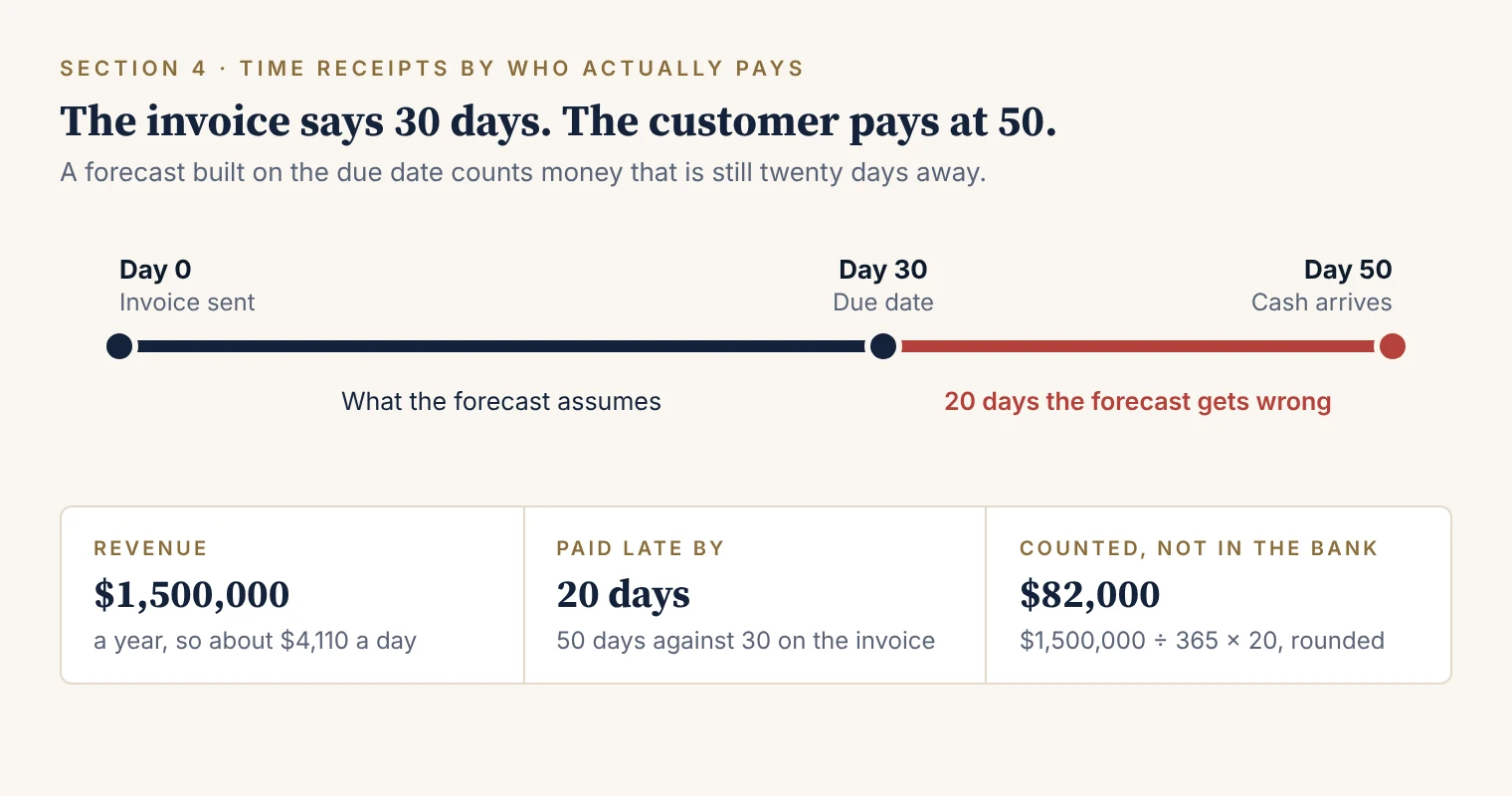
Take a client on $1.5M in revenue whose customers pay at 50 days against net 30 terms. $1.5M ÷ 365 × 20 is $82,192 of sales landing twenty days later than a terms-based forecast says. If the client charged sales tax, the cash would be higher again, but this one sells for resale and charges none. That's $82,192 the forecast puts in the bank that isn't there, every single week, and it can be enough to hide a line of credit running out completely (section 6 shows one).
The timing rules
| Situation | How the receipt is timed |
|---|---|
| The customer has at least 3 paid invoices in the last 12 months | Invoice date plus the customer's average days to pay, weighted by invoice value |
| The customer has fewer than 3 paid invoices | Due date plus the delay the client gave in the five answers |
| Fewer than 3 paid invoices, and no estimate from the client | Due date plus the average days late of all customers. Claude flags the customer |
| The expected date is already past | Week 2, and the invoice goes on the chase list |
| The invoice is in dispute, or more than 30 days older than the customer's average | Not forecast. Claude lists it for you and the client to decide |
| Sales not yet invoiced | Split by each customer's share of the last 12 months' sales, then timed by that customer's average days |
The average is weighted by value so one small invoice paid late doesn't drag a big customer's timing about. The minimum of three is there because two invoices tell you what happened twice, not what a customer usually does.
Run it
Run this prompt when you take on a new client. Run it again on the first Monday of each month. The prompt refreshes the payment history on the Inputs tab. It also lists the customers who pay more slowly than before.
- Export Invoices and Received Payments and A/R Aging Detail (section 1).
- Start a new chat.
- Upload the two exports.
- Copy the prompt below into the message box.
- Fill in the square brackets.
- Send the prompt.
Using the attached QuickBooks Online exports, build a payment history
table for [CLIENT CODE]. Do every calculation in code. Use the
QuickBooks connector, for reading only, to confirm the company name is
[COMPANY NAME IN QUICKBOOKS].

1. Take every invoice paid in the 12 months to [MM/DD/YYYY].
2. For each invoice, work out the days from invoice date to the date
   it was paid.
3. For each customer, work out:
   - the number of paid invoices
   - the average days to pay, weighted by invoice value
   - the average days after the due date
   - the shortest and the longest days to pay
   - the open balance today, from A/R Aging Detail
4. Work out the same averages for all customers together.
5. Mark any customer with fewer than 3 paid invoices "fallback".
6. Sort by open balance, largest first.
7. Compare each customer's average for the last 3 months with the 9
   months before. List every customer who is paying more than 7 days
   slower.

Give me the table as an Excel file, and show the calculation for the
largest customer.Check it
- Take the largest customer on the table.
- Open that customer in QuickBooks.
- Select three paid invoices.
- For each invoice, count the days from the invoice date to the payment date.
- Confirm that each count is between the shortest and the longest days on the table.
What the table looks like
Illustration: MRW01, a US wholesale distributor and S corporation on $1.5M in revenue with net 30 terms, forecast built on Monday 10/19/2026. The client and the figures are invented. MRW01 runs through the rest of this guide.
| Customer | Paid invoices, last 12 months | Average days to pay | Days after due date | Open now | Lands in | Rule |
|---|---|---|---|---|---|---|
| A | 250 | 62 | 32 | $77,737 | Weeks 1 to 9 | Own history |
| D | 249 | 58 | 28 | $37,456 | Weeks 1 to 9 | Own history |
| B | 250 | 46 | 16 | $33,502 | Weeks 1 to 7 | Own history |
| 38 smaller customers | 250 in total | 43 | 13 | $31,081 | Weeks 1 to 7 | Each customer's own history |
| C | 250 | 32 | 2 | $15,468 | Weeks 1 to 5 | Own history |
| E | 248 | 44 | 14 | $14,809 | Weeks 1 to 7 | Own history |
| D, invoice in dispute | $9,800 | Not forecast | The client says it's in dispute | |||
| F, new customer | 0 | Not invoiced yet: $60,000 on 11/16 | Week 11 | Fallback: due date plus the 14 days the client expects | ||
| All customers | 50 | 20 | $219,853 |
A terms-based forecast puts Customer A's $42,549 of overdue invoices in week 1. This one spreads them over the weeks A actually pays in, and it lands the new customer's holiday order two weeks after its due date, because that's what the client said to expect.
Put the IRS and the State in the Right Week
The dates are fixed, the amounts are mostly known, and they tend to land in the same weeks as payroll. Put one in the wrong week and the forecast shows headroom the client hasn't got.
| Tax | Who pays it | Due | Week it goes in | Amount comes from | Prompt rule |
|---|---|---|---|---|---|
| Federal payroll tax deposits, monthly schedule | Employers whose lookback period total was $50,000 or less | By the 15th of the month after the wages were paid | The week of the deposit date | Payroll register | T1 |
| Federal payroll tax deposits, semiweekly schedule | Employers whose lookback period total was more than $50,000 | Wednesday, Thursday or Friday paydays: the following Wednesday. Saturday to Tuesday paydays: the following Friday | The week of the deposit date, which is often the week after payday | Payroll register | T1 |
| $100,000 next-day rule | Any employer that piles up $100,000 or more of payroll tax on one day | The next business day | The next business day | Payroll register | T1 |
| State withholding and state unemployment | Employers, by state | Set by each state | The date you type into T2 | The state's rules and the last filings | T2 |
| Sales tax | Businesses that collect it | Set by each state, often monthly or quarterly | The date you type into T3 | The sales tax liability on the balance sheet | T3 |
| Pass-through entity tax (PTET) | S corporations and partnerships in states with an elective PTET | Set by each state's election rules | The date the owner decides to pay | Your tax projection | T4 |
| Corporate estimated tax | C corporations | The 15th day of the 4th, 6th, 9th and 12th months of the tax year. Calendar year: April 15, June 15, September 15, December 15 | The week of the date | Your tax projection | T4 |
| Individual estimated tax | Owners paying their own estimates, often from the business account as a distribution | For 2026: April 15, June 15 and September 15, 2026, and January 15, 2027 | The week of the date, if the owner pays it from the business account | Your tax projection | T5 |
Rule T7 flags every tax figure Claude had to estimate, in red, so nobody mistakes an estimate for a computation.
Weekends and holidays. A federal deadline that falls on a Saturday, Sunday or legal holiday moves to the next business day (IRC Section 7503). With weeks running Monday to Sunday, that can push a payment into the next week. That's why rule T6 asks how the client pays: put the payment where the money actually leaves, not where the law says it's still on time.
Getting the money there in time. The IRS's Publication 15 for 2026 says EFTPS accepts same-day payments of $1 million or less if they're submitted before 3:00 p.m. Eastern time on a business day, and payments over $1 million must be submitted by 8:00 p.m. Eastern time the day before the due date. A payroll provider that deposits for the client may have its own cutoffs, and many take the tax from the client's account with the payroll itself, before the IRS due date. If so, the provider's debit date is the date that goes in the forecast.
Holidays in this forecast window. Veterans Day, Wednesday 11/11/2026. Thanksgiving, Thursday 11/26/2026. Christmas, Friday 12/25/2026. New Year's Day, Friday 01/01/2027. Banks follow the Federal Reserve schedule.
State taxes are inputs. Withholding, unemployment, sales tax and PTET all run on each state's own rules and dates, so they go into rules T2 to T4 as inputs you confirm. They're the figures in the forecast that Claude takes on trust, which is why the person who signs agrees them (section 10).
MRW01's Taxes tab
Illustration, continued. MRW01 pays semimonthly, on the 15th and the last day of each month, or the business day before. Its lookback period total was over $50,000, so it is a semiweekly depositor. Each payday's federal deposit is $2,144: $920 of withheld federal income tax plus $612 each of the employee and employer shares of Social Security and Medicare. MRW01's state withholding is $336 a payday, paid monthly by the 15th of the next month. That state rule is invented for the illustration. MRW01 sells for resale, so it collects no sales tax. MRW01 schedules every payment to land by the due date.
| Payment | For | Legal due date | Money leaves | Week | Amount |
|---|---|---|---|---|---|
| Federal deposit | Payday Thu 10/15 | Wed 10/21 | Wed 10/21 | 1 | $2,144 |
| State unemployment | Q3 | Sat 10/31 | Fri 10/30 | 2 | $380 |
| Federal deposit | Payday Fri 10/30 | Wed 11/04 | Wed 11/04 | 3 | $2,144 |
| State withholding | October | Sun 11/15 | Fri 11/13 | 4 | $672 |
| Federal deposit | Payday Fri 11/13 | Wed 11/18 | Wed 11/18 | 5 | $2,144 |
| Federal deposit | Payday Mon 11/30 | Fri 12/04 | Fri 12/04 | 7 | $2,144 |
| State withholding | November | Tue 12/15 | Tue 12/15 | 9 | $672 |
| PTET | 2026, the owner's decision | By 12/31 to deduct in 2026 | Wed 12/16 | 9 | $14,000 |
| Federal deposit | Payday Tue 12/15 | Fri 12/18 | Fri 12/18 | 9 | $2,144 |
| Federal deposit | Payday Thu 12/31 | Wed 01/06 | Wed 01/06 | 12 | $2,144 |
| Owner's federal estimate, paid as a distribution | 2026, fourth payment | Fri 01/15/2027 | Fri 01/15/2027 | 13 | $16,000 |
| State withholding | December | Fri 01/15/2027 | Fri 01/15/2027 | 13 | $672 |
| Federal deposit | Payday Fri 01/15/2027 | Thu 01/21/2027 | Thu 01/21/2027 | After week 13 | $2,144 |
| FUTA | 2026 | No deposit while the quarter's FUTA tax is $500 or less. The balance is paid with the annual Form 940 | After week 13 | After week 13 | Flagged for review |
| Total in the 13 weeks | $45,260 |
Two rows show why the rules matter. The 11/30 payday is a Monday, so its deposit isn't due until Friday 12/04, in the following week. The 01/15/2027 payday deposit would be due Wednesday 01/20, but Monday 01/18 is Martin Luther King Jr. Day, a legal holiday inside the three business days, so it moves to Thursday 01/21 and out of the 13 weeks.
Never put payroll tax on the hold-back list
Withheld income tax and the employee share of Social Security and Medicare are trust fund taxes. If they aren't deposited, the IRS can assess the Trust Fund Recovery Penalty, 100% of the unpaid trust fund tax, personally on anyone responsible for paying them over who acted willfully, and Publication 15 lists an accountant among the people who can be a responsible person (IRC Section 6672). So in section 7, payroll tax deposits stay off every list of payments the client could move.
The tax rows are where strategy shows up
Look at the Taxes tab again. Most of it is compliance: the deposits and state payments are due when they're due. But four kinds of rows in a forecast like this are decisions with a tax answer behind them:
- The PTET payment before December 31. A cash-basis S corporation or partnership deducts the payment in the year it's paid (IRS Notice 2020-75), which is why so many owners pay by December 31. Whether to elect, how much to pay and which day it leaves are tax decisions, and the forecast shows whether there's cash on that day.
- The owner's January 15 estimate. Paid from the business as a distribution, it's a real outflow in week 13. The amount depends on the owner's whole-year picture, not just the business.
- A year-end bonus or a year-end distribution. One is wages with payroll tax, the other isn't, and they land in different rows and different weeks.
- A retirement plan contribution. A larger employer contribution or a different kind of plan can move the owner's tax bill by more than any single row on this page, and it has a funding date the forecast can test.
The forecast is the first place a firm sees whether the client can fund those decisions, or has cash sitting in the bank that should be doing a job. That's the point to bring in a strategist.
The Worked Illustration: MRW01
Everything in this section is an illustration. MRW01 isn't a real client, and every figure was built to show how the workbook behaves. The arithmetic was done in code, so every row adds up and each week's closing cash is the next week's opening.
The inputs
| Input | MRW01 |
|---|---|
| Business | US wholesale distributor, S corporation, $1.5M in revenue. Sells for resale, so it charges no sales tax |
| Customers | Net 30 terms. They pay at 50 days on average, weighted by value (section 4) |
| Forecast start | Monday 10/19/2026. Week 13 ends Sunday 01/17/2027 |
| Opening cash | $2,000, and the line is undrawn |
| Line of credit | $75,000 |
| Sales | $125,000 a month. Sales are flat year on year, so rule R6 gives the same figure both ways |
| Suppliers | Cost of sales is 66% of sales. MRW01 pays suppliers on the due date, net 30 |
| Payroll | Semimonthly. Net pay $5,732 and 401(k) deferrals $400 each payday. Taxes as in section 5 |
| Recurring bills | Rent $5,000 on the 1st. Software and phone $900 on the 10th |
| Other overheads | $950 a week, from the last three months' profit and loss |
| Truck loan | $760 on the 5th, found in the bank register |
| Regular distribution | $8,000 on the last business day of each month, found in the bank register and confirmed by the owner |
| Taxes | As in section 5 |
The five answers
| # | Question | MRW01's answer |
|---|---|---|
| 1 | Orders not invoiced | A new customer's holiday order, $60,000, invoiced on 11/16. The stock for it costs $39,600, billed on 11/09 and paid on net 30 |
| 2 | Finance not in QuickBooks | A forklift on a new equipment loan: $1,240 a month on the 20th, from 11/20 |
| 3 | One-off payments | Insurance renewal, $9,600 on 12/15 |
| 4 | Late or early payers | Customer D disputes a $9,800 invoice from July, so don't count on it. The new customer expects to pay about two weeks after the due date |
| 5 | Distributions and taxes | A $14,000 PTET payment on 12/16, decided with the CPA so it's deducted in 2026. A $30,000 year-end distribution on 12/18. The owner's fourth 2026 federal estimate, $16,000, paid from the business on 01/15/2027 |
The 13 weeks
| Week | Week starting | Opening cash | Money in | Money out | Taxes | Closing cash | Headroom | Closing cash if customers paid on terms |
|---|---|---|---|---|---|---|---|---|
| 1 | Oct 19 | $2,000 | $14,382 | $19,630 | $2,144 | $(5,392) | $69,608 | $93,429 |
| 2 | Oct 26 | $(5,392) | $42,256 | $39,651 | $380 | $(3,167) | $71,833 | $83,597 |
| 3 | Nov 2 | $(3,167) | $29,143 | $21,290 | $2,144 | $2,542 | $77,542 | $91,203 |
| 4 | Nov 9 | $2,542 | $28,236 | $23,734 | $672 | $6,373 | $81,373 | $90,562 |
| 5 | Nov 16 | $6,373 | $30,996 | $21,833 | $2,144 | $13,392 | $88,392 | $96,289 |
| 6 | Nov 23 | $13,392 | $27,569 | $20,593 | $0 | $20,367 | $95,367 | $105,458 |
| 7 | Nov 30 | $20,367 | $30,088 | $42,553 | $2,144 | $5,759 | $80,759 | $92,403 |
| 8 | Dec 7 | $5,759 | $29,829 | $58,818 | $0 | $(23,231) | $51,769 | $59,901 |
| 9 | Dec 14 | $(23,231) | $28,104 | $69,633 | $16,816 | $(81,576) | $(6,576) | $66,347 |
| 10 | Dec 21 | $(81,576) | $25,855 | $18,318 | $0 | $(74,039) | $961 | $74,344 |
| 11 | Dec 28 | $(74,039) | $89,173 | $39,424 | $0 | $(24,290) | $50,710 | $60,339 |
| 12 | Jan 4 | $(24,290) | $34,856 | $21,360 | $2,144 | $(12,938) | $62,062 | $70,926 |
| 13 | Jan 11 | $(12,938) | $28,071 | $25,832 | $16,672 | $(27,371) | $47,629 | $56,831 |
| Total | $438,557 | $422,668 | $45,260 |
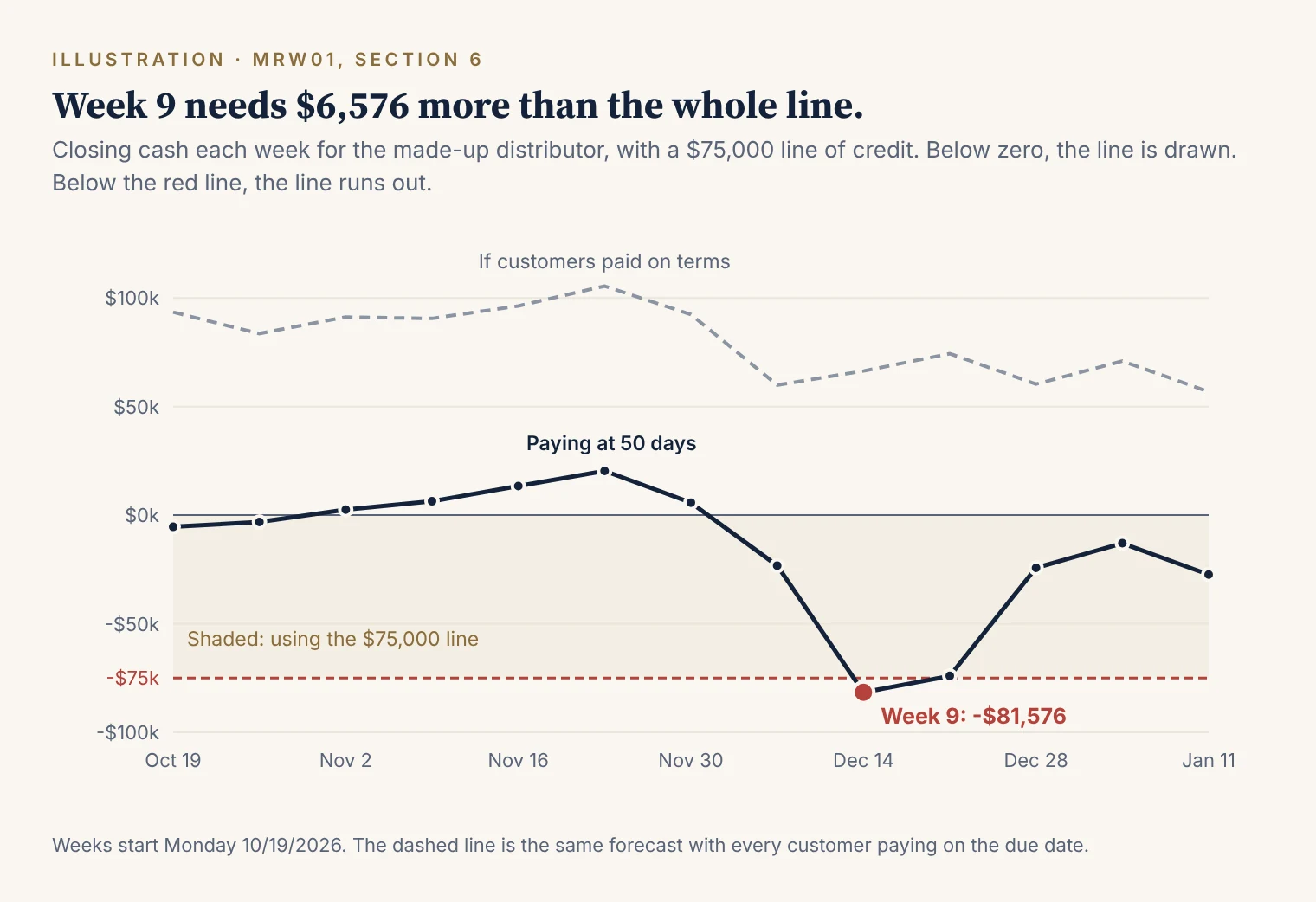
Headroom is closing cash plus the $75,000 line. Negative closing cash means the line is drawn. Negative headroom is a week the client would need more than the whole line.
Week 1 money in is light and week 2 is heavy because of rule R4: twelve open invoices worth $12,097 had expected dates that were already past, so they sit in week 2 and on the chase list.
What it shows
Week 9, the week of 12/14, is the short week. MRW01 closes $81,576 into its line, $6,576 more than the whole $75,000. Week 10 is inside the line by only $961.
Here's what goes out in week 9:
| Money out and taxes, week 9 | Amount | Where it came from |
|---|---|---|
| Year-end distribution | $30,000 | Front sheet, answer 5 |
| Suppliers | $21,711 | Purchases not yet billed (rule P2) |
| PTET | $14,000 | Front sheet, answer 5 |
| Insurance renewal | $9,600 | Front sheet, answer 3 |
| Net pay | $5,732 | Inputs tab |
| Federal payroll tax deposit | $2,144 | Taxes tab, rule T1 |
| Forklift loan | $1,240 | Front sheet, answer 2 |
| Other overheads | $950 | Profit and loss run rate |
| State withholding | $672 | Taxes tab, rule T2 |
| 401(k) deferrals | $400 | Inputs tab |
| Total | $86,449 |
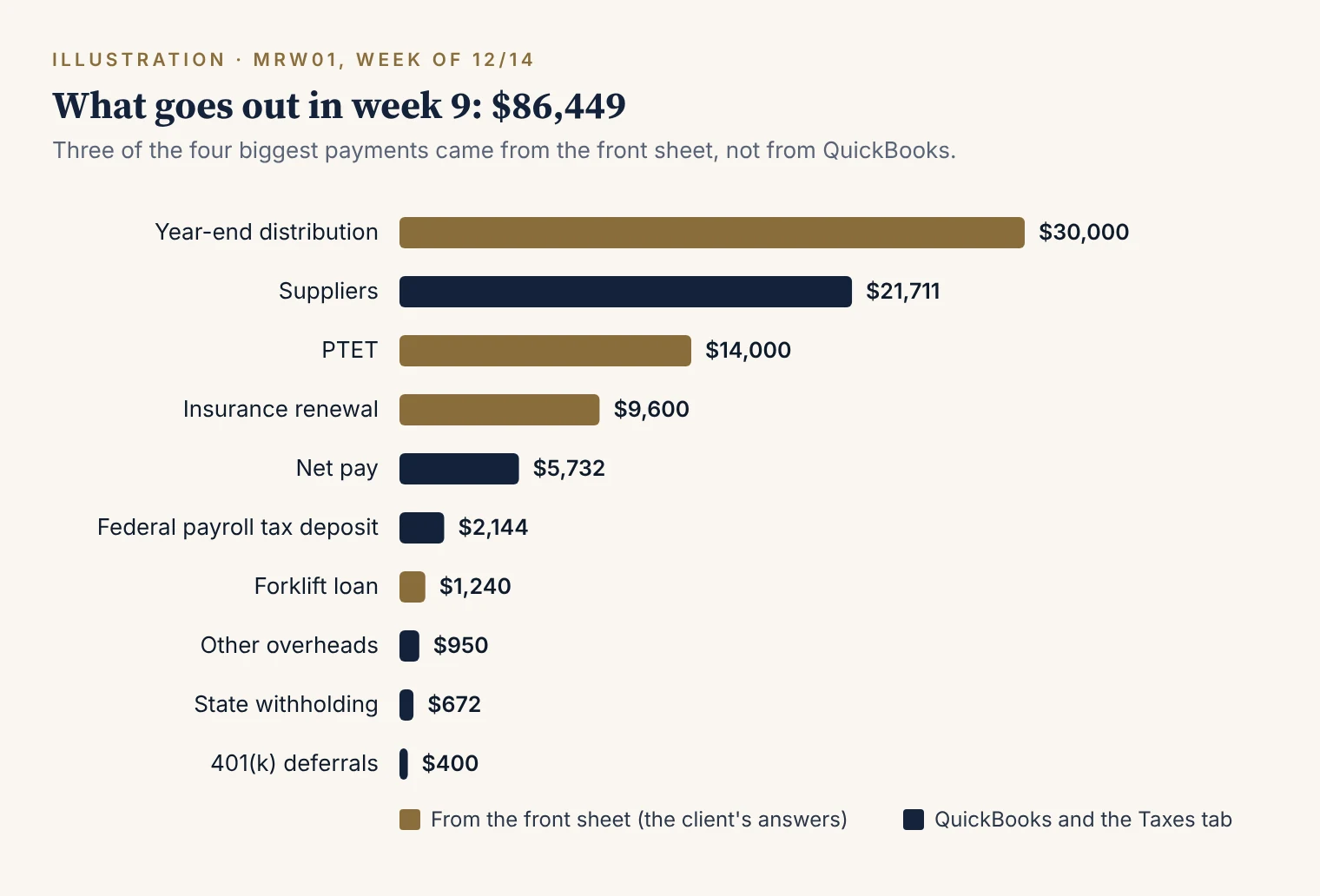
The week before, MRW01 pays $39,600 for the holiday stock on 12/09. The new customer's $60,000 for it doesn't arrive until 12/30, in week 11. So the client pays for the stock, renews the insurance, pays the PTET and takes a year-end distribution, all before the money for the order comes in.
Without the five answers, there's no short week at all. The holiday order, the forklift loan, the insurance, the PTET, the year-end distribution and the January estimate weren't in QuickBooks on 10/19. Leave them out and week 9 closes at $14,104, with cash in the bank and the line untouched, and wrong. Weeks 1 to 4 are all money from invoices already in QuickBooks. By week 8, more than half the money in comes from sales MRW01 hadn't made when the forecast was built.
The terms-based version never draws the line. The last column is the same forecast with every customer paying on the due date. Its lowest week is $56,831 in cash. From week 2 to week 8 it sits between $82,898 and $88,661 above the payment-history version, which is the $82,192 from section 4, give or take the week-to-week swing in sales. Built that way, the forecast tells the owner the PTET payment and the distribution are fine.
The Week It Runs Short, and the Three Moves
A forecast that shows a red week and stops there has done half the job. What the owner wants to know is what they can do about it, in what order, and by when. In MRW01's case there are eight weeks to do it in, and that notice is what a 13-week view buys.
Find the short week
- Open the chat that holds the client's workbook.
- Copy the prompt below into the message box.
- Send the prompt.
Use the 13-week cash flow tab for [CLIENT CODE]. Do every
calculation in code.

1. Name the first week headroom goes below zero, and by how much.
2. List every other week with headroom below zero.
3. For the first short week and the week before it, list every
   receipt and payment over $[1,000], largest first.
4. Explain in two plain sentences what causes the shortfall.The three moves
They're in the order they usually land. A chased invoice can arrive in days. A supplier can agree a new date on one phone call. A bank takes longest, so ask early even if you hope not to need it.
| Move | The rule |
|---|---|
| 1. Who to chase | Take the invoices due on or before the last day of the short week that the forecast lands after it, plus anything already more than 60 days overdue. Group them by customer. Score each customer: amount × average days late. Chase the highest scores first |
| 2. What to hold back | Take the supplier payments in the short week and the week before, largest first. Mark each one as a key supplier, a supplier who could take a later date, or unsure. The client decides which suppliers to ask |
| 3. What to ask the bank for | Take the lowest closing cash, add a buffer, and round up to the next $5,000. That's the temporary line to ask for. Give the weeks it's needed, and the week the client comes back inside the current line |
Net pay, retirement plan deductions, federal payroll tax deposits and state withholding stay off the hold-back list (section 5). So does any tax with a fixed due date.
Distributions, the PTET payment and the owner's estimates are the owner's decisions. The prompt lists them separately, so they're in front of the owner without being part of the recommendation.
Run it
- Open the same chat.
- Copy the prompt below into the message box.
- Fill in the square brackets.
- Send the prompt.
The forecast for [CLIENT CODE] needs more than the line of credit in
week [N]. Work out the three moves that close it soonest. Do every
calculation in code.

MOVE 1: WHO TO CHASE
- List the invoices that are due on or before the last day of week
  [N] but that the forecast lands after it.
- Add any balance already more than [60] days overdue, and every
  invoice marked "not forecast".
- Group them by customer. Score each customer: amount x average days
  late. Rank by score, highest first.
- For the top 3, say how much would land by week [N] if they paid on
  the due date.

MOVE 2: WHAT TO HOLD BACK
- List the supplier payments in weeks [N-1] and [N], largest first.
- Leave out net pay, retirement plan and benefit deductions, federal
  payroll tax deposits, state withholding and every other tax with a
  fixed due date. Never suggest moving any of these.
- Mark each payment: key supplier, could take a later date, or
  unsure.
- For each payment, show closing cash in week [N] if it moved two
  weeks later.
- List distributions, PTET and owner tax payments in weeks [N-1] and
  [N] separately, as the owner's decisions.

MOVE 3: WHAT TO ASK THE BANK FOR
- Peak need: the lowest closing cash, plus a buffer of $[5,000].
- The temporary line to ask for, rounded up to the next $5,000.
- The first and last week it is needed, the week closing cash comes
  back inside the current line, and what brings it back.
- A one-page summary for the bank, as a Word document: the 13-week
  table, the A/R aging with each customer's average days to pay, the
  A/P aging, the profit and loss for the year to date, the tax
  payments in the forecast, and the cause of the shortfall in two
  sentences.

Then show closing cash for weeks [N-2] to [N+2]: before any move,
after move 1, after move 2, and after moves 1 and 2 together.What a bank will want to see
The one-page summary covers what a lender will ask: how much, from when, until when, and why. The why matters most. A one-off pinch with a dated way out (a holiday order paid in week 11) is a different conversation from a business that runs short every month. If a distribution falls in the short week, expect the bank to ask about it.
If the pinch is an IRS payment
The IRS's route is a payment plan. On irs.gov it describes short-term plans, for balances paid in 180 days or less, and long-term plans, also called installment agreements, paid monthly. Penalties and interest keep running until the balance is paid, so paying sooner costs less. Check the current terms at irs.gov/payments/payment-plans-installment-agreements before you discuss one. A payment plan is for a tax already owed. It is never a reason to skip a payroll deposit, for the reason in section 5. Either way, the 13-week forecast is the evidence of money in and money out that conversation needs.
MRW01's three moves
Illustration, continued. Short week: week 9, $6,576 more than the line.
Who to chase:
| Rank | Customer | Due by 12/20 but landing after it | Average days late | Score ($000 × days) |
|---|---|---|---|---|
| 1 | A | $45,489 | 32 | 1,456 |
| 2 | F, the new customer | $60,000 | 14 | 840 |
| 3 | D | $20,066 | 28 | 562 |
D's disputed $9,800 goes on the list too. It isn't in the forecast, so settling it is pure upside.
What each move does to week 9:
| Move | What it means for MRW01 | Week 9 closes at | Against the line |
|---|---|---|---|
| None | $(81,576) | $6,576 more than the line | |
| 1. Chase F | The new customer pays the holiday order on the due date, 12/16, instead of 12/30 | $(21,576) | $53,424 inside |
| 1. Chase A | A pays a week faster on the invoices due by 12/20, bringing $8,929 forward | $(72,647) | $2,353 inside |
| 2. Hold back | The holiday stock supplier takes its $39,600 on 12/30, the day the customer pays, instead of 12/09 | $(41,976) | $33,024 inside |
| 3. Bank | A temporary line of $90,000 ($81,576 plus a $5,000 buffer, rounded up), from 12/14 to 12/27, because week 10 is only $961 inside. Comfortably back inside $75,000 in week 11, when the holiday order is paid | $(81,576) | $8,424 inside the temporary line |
| Owner's call | The $14,000 PTET payment moves from 12/16 to 12/31. It's still paid in 2026 | $(67,576) | $7,424 inside |
| Owner's call | The $30,000 year-end distribution moves from 12/18 to 01/08/2027 | $(51,576) | $23,424 inside |
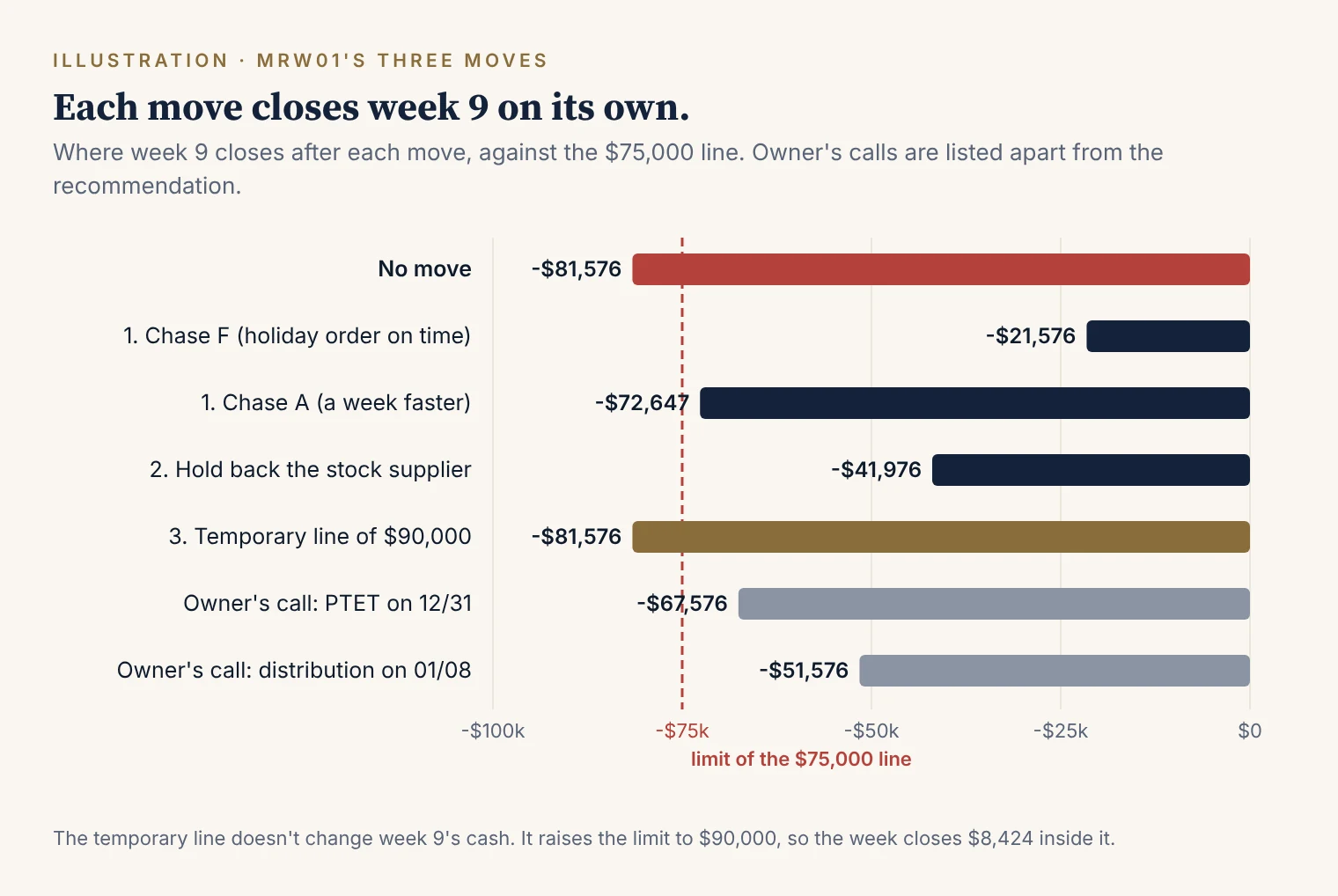
Each move closes week 9 on its own. Asking the new customer to pay the holiday order on terms, or for a deposit, is the cleanest, and it's a conversation the client can have this week, eight weeks before it matters. Chasing A works, but only by $2,353.
The PTET row needs a second look before anyone moves it. Paid on 12/31, it lands the day after the new customer is expected to pay, and the year of the deduction doesn't change. But that 12/30 date is itself the client's estimate of a late payer. If the customer slips into January, week 11 closes at $(84,290), $9,290 more than the line, and a PTET payment made after 12/31 is deducted in 2027, not 2026. Don't put a tax deadline behind a late payer without a fallback.
The Client Email and One Chart
The owner won't read thirteen columns. They'll read a chart with one line on it and a short email that tells them which week to worry about and what to do.
The chart
| Element | Spec |
|---|---|
| Type | Line chart |
| The line | Closing cash at the end of each week, weeks 1 to 13 |
| The limit | The line of credit as a flat, dashed red line at minus the limit, for example $(75,000) |
| X axis | Week starting dates, for example "Oct 19", "Oct 26" |
| Y axis | $ in thousands, with zero marked |
| The marker | A dot on the lowest week, labeled with the week and the amount |
| Title | One plain sentence, for example "Cash is tightest in the week of December 14" |
| Leave out | Bars, receipts, payments, a second scenario, anything else |
| Where it goes | On the 13-week cash flow tab, and as an image pasted into the email |
Run it
- Open the chat that holds the client's workbook.
- Copy the prompt below into the message box.
- Paste the email template under it.
- Send the prompt.
- Read the email before you send it to the client.
Using the 13-week cash flow for [CLIENT CODE]:

1. Make one line chart, in code: closing cash for each week, and the
   line of credit as a dashed red line at $([LIMIT]). Label the x
   axis with the week starting dates. Show $ in thousands, with zero
   marked. Put a dot and a label on the lowest week. Title it with
   one plain sentence that says when cash is tightest. No other
   lines or bars.
2. Add the chart to the 13-week cash flow tab. Also give it to me as
   a PNG image.
3. Draft the email to the client from the template below. Fill every
   square bracket from the workbook and the three moves. Keep it
   under 250 words. Use "money in" and "money out". Do not use
   accounting terms such as receivables, payables, debtors,
   creditors, accruals or headroom.
4. Under the email, list every figure in it with the cell it came
   from.

[PASTE THE EMAIL TEMPLATE]The email template
Subject: Your cash for the next 13 weeks, and one week to plan for

Hi [FIRST NAME],

Thanks for answering our questions. We've put together your cash
forecast for the next 13 weeks, from [WEEK 1 DATE] to [WEEK 13 END
DATE]. The chart below shows what we expect to be in the bank at the
end of each week. Below zero means you're using your line of credit.
The red line is the most the bank will lend you on it, $[LIMIT].

[CHART]

The short version: cash is tightest in the week of [SHORT WEEK
DATE]. That week we expect you to need about $[AMOUNT] more than
your line of credit, mainly because [WHAT GOES OUT] goes out before
[WHAT COMES IN] arrives.

There are three ways to fix it, and we'd try them in this order:

1. Ask [CUSTOMER 1] and [CUSTOMER 2] to pay on time. Between them they
   owe $[AMOUNT] that's due before [DATE], but going by how they've
   paid this year, it won't arrive until after it.
2. Ask [SUPPLIER] whether they'd take their $[AMOUNT] on [NEW DATE]
   instead of [DUE DATE].
3. If neither comes through by [DECISION DATE], ask [BANK] to raise
   your line of credit to $[AMOUNT] from [DATE] to [DATE]. We can
   prepare the figures they'll want to see.

[ONLY IF A DISTRIBUTION OR AN OWNER TAX PAYMENT FALLS IN THE SHORT
WEEK: You also mentioned the $[AMOUNT] [distribution / tax payment] on
[DATE]. Moving it to [DATE] would fix most of this on its own. For a
tax payment the date can change the tax, so let's talk it through
before you move it.]

Every tax payment is in: [payroll taxes of $X each pay period],
[state payments of $X on DATE], [the $X payment on DATE].

Two things to check with you:
- [QUESTION ABOUT AN ASSUMPTION]
- [QUESTION ABOUT AN ASSUMPTION]

We'll update this every Monday and tell you if anything moves. If an
order, a big payment or a late customer comes up in the meantime,
let us know and we'll put it in.

[YOUR NAME]Every Monday in Ten Minutes
The forecast you sent last week is out of date by this Monday. Rolled forward every week, it gets better instead of staler, because each Monday you see where last week's version was wrong and why.
Run it
- Export the eight reports again, dated to yesterday (section 1).
- Start a new chat.
- Upload last week's workbook and this week's exports.
- Copy the prompt below into the message box.
- Fill in the square brackets.
- Send the prompt.
- Read the Variance tab and Claude's five lines.
Attached is last week's 13-week cash flow for [CLIENT CODE], and this
week's QuickBooks Online exports.

1. Use the QuickBooks connector for reading only. Tell me the company
   it is reading, and the company name in each export header. If any
   is not [COMPANY NAME IN QUICKBOOKS], stop and tell me.
2. Fill in the Variance tab for the week starting [LAST MONDAY'S
   DATE]: forecast, actual and difference for money in from
   customers, money out to suppliers, net pay and deductions, other
   money out, taxes, and closing cash. Take the actuals from the bank
   register export. Take actual closing cash from the bank balances,
   and compare them with the connector.
3. If money in from customers missed by more than $[5,000], list the
   customers and invoices that caused it.
4. Roll the forecast forward. Drop last week. Renumber the other
   weeks 1 to 12. Add a new week 13 starting [MM/DD/YYYY].
5. Set week 1 opening cash to the bank balances at the end of
   [YESTERDAY'S DATE].
6. Read the A/R and A/P aging, the recurring templates and the bank
   register again. Re-time everything with the rules on the Inputs
   tab.
7. If today is the first Monday of the month, refresh the payment
   history on the Inputs tab. List every customer whose average moved
   by more than 7 days.
8. Rerun the Checks tab.
9. Save the workbook as "[CLIENT CODE] 13-week cash w/c [MM-DD-YYYY]".

Do every calculation in code. Then tell me, in five lines or fewer:
the lowest week and its closing cash, the first short week and the
size of the shortfall (or "none"), what changed since last week and
why, and who to chase this week.When last week missed
| What happened | What to do |
|---|---|
| Money in from customers missed by less than the threshold | Nothing. The Variance tab keeps the record |
| Money in from customers missed by more than the threshold | Find the customers. Ask the client why. If a customer's habit has changed, re-time all of that customer's invoices, then look at the short week again |
| The same customer missed two Mondays running | Refresh that customer's average now, not at the month end. Put them on the chase list |
| Closing cash moved by more than the receipts and payments explain | Check the bank reconciliation before you trust anything else in the forecast |
Set the threshold per client. For a business with weekly money in around $25,000, $5,000 is a fifth of a week. For MRW01, the firm uses $3,000, about a tenth of a normal week. For a bigger client, use a percentage of the week's forecast money in instead.
MRW01's first Monday
Illustration, continued. Monday 10/26/2026.
| Line | Forecast | Actual | Effect on cash | Over $3,000? |
|---|---|---|---|---|
| Money in from customers | $14,382 | $10,655 | $(3,727) | Yes |
| Money out | $19,630 | $20,015 | $(385) | No |
| Taxes | $2,144 | $2,144 | $0 | No |
| Closing cash | $(5,392) | $(9,504) | $(4,112) |
Customer A paid nothing in week 1, against $3,727 forecast. The client calls A and finds they've moved their payment run, so they now pay at about 70 days instead of 62. Re-timed, the week of 12/14 closes at $(89,108), $14,108 more than the line instead of $6,576. The week of 12/21 goes past the line too, by $10,426.
One customer paying eight days later turned a one-week pinch into two. The roll-forward caught it on the first Monday, seven weeks before the first of them.
Optional: have it ready before you get in
Claude Cowork can run the roll-forward as a scheduled task, so the draft is waiting on Monday morning. Scheduled tasks need a paid plan. This task reads last week's workbook and this week's exports from a folder on your computer, so the Claude desktop app has to be open when it runs, and someone has to save the new exports to the folder first.
Read this before you set it up. The QuickBooks connector reads whichever company it's connected to at the time. If someone switches the connection to a different client during the week, the task reads that client. Step 1 of the prompt checks the company name against the exports, so a wrong client stops the task.
- Open Cowork in the Claude desktop app.
- In the sidebar, select Scheduled.
- Select New task.
- Select Create with Claude.
- Type the description below.
- Paste the roll-forward prompt under it.
- Check that the task shows under Scheduled.
- Confirm that the next run is on a Monday morning.
Every Monday at 7am, run the prompt below for [CLIENT CODE]. Use the
latest workbook and this week's exports in the folder [FOLDER NAME].
If this week's exports are not in the folder, stop and tell me. Save
the new workbook in the same folder. Use the QuickBooks connector for
reading only. Do not send anything to anyone.The Checks
Claude reads the exports and builds the workbook. Nothing goes to a client or a bank until a person has done each of these.
| Check | Who does it | What it catches |
|---|---|---|
| Every line on the Checks tab shows zero | Preparer | A total that doesn't tie back to the exports |
| Opening cash agrees to the bank statements as well as QuickBooks | Preparer | A bank reconciliation that's behind |
| The company name in the connector and in every export matches the client | Preparer | Another client's figures in this client's forecast |
| The five answers are on the front sheet, with a date | Preparer | A forecast built only on what QuickBooks can see |
| Two customers' timing ticked back to their paid invoices | Preparer | A payment date matched to the wrong invoice |
| Every customer on fallback timing, and every "not forecast" invoice, agreed with the client | Manager | A disputed invoice counted as cash, or a new customer timed on a guess |
| Payroll, the deposit schedule and every federal and state tax amount and date agreed to the payroll register, the state filings and the tax projection | Person who signs | A tax payment in the wrong week or at the wrong amount |
| PTET, corporate estimates and owner estimates agreed to the tax projection and the owner's decision | Person who signs | A tax decision forecast on a date or amount nobody agreed |
| The email and chart read as the client will read them | Manager | A number or a word the client will misread |
| The bank summary checked before it goes | Person who signs | A figure a lender will hold the client to |
On client data: tell Claude to use the connector for reading only in every chat, and keep the build on the exports. On Team, the firm's data sits under business terms and isn't used to train Claude's models. If the firm prepares the client's return, check the consent point in section 1. Note on the front sheet that the forecast was drafted with Claude and who reviewed it. That line is the control.
Rolling It Out in the Firm
Start with one client: the one who called the last time their line of credit got close.
| When | What | Who |
|---|---|---|
| Week 1 | Switch on file creation, connect QuickBooks, export the eight reports, and run the payment history prompt on the firm's own books, if the firm is on QuickBooks Online | Whoever prepares management reports now |
| Week 1 | Send the five questions to one client | Client manager |
| Week 2 | Build the 13 weeks, run the checks, and review | Same person, reviewed by a manager |
| Week 2 | Send the email and chart, with the three moves if there's a short week | Manager or partner |
| Weeks 3 to 6 | Roll it forward every Monday and keep the Variance tab | Same person |
| Week 6 | Look at four weeks of variances, set the threshold, and agree a monthly fee | Partner and practice manager |
| Week 7 | Add two more clients | Same person |
Agree the fee before the client gets used to receiving it free. A forecast rolled every Monday is a service with a cost to the firm, and it should be priced like one.
If the variances settle inside your threshold, write the Monday routine into your procedures and give the rest of the team access. If they don't, find which timing rule keeps missing before you add clients.
What's Next
You've got the workbook, the rules and the Monday routine, so there are two ways forward from here.
Run it yourself. Send the five questions this week to the client who called the last time their line of credit got close. Build the 13 weeks when the answers come back, and roll it forward next Monday. One client for a month tells you whether to do it for ten.
Bring in a partner when the forecast turns into a tax conversation. Once the Taxes tab is right, it starts asking questions: whether the PTET should go out before December 31, what the owner's January estimate should be, whether there's room for a larger retirement contribution, or cash sitting in the account that should be doing a job. That's the work I do with CPA firms. I work through you and never approach your clients directly, the return and the compliance work stay with your firm, and your firm earns from every engagement.
Partner with Darling FGUS and Canadian firms. Six quick questions.
P.S. Before you run section 4 on a client, run it on your own firm's books. Most of us have never looked at how long our own clients take to pay us.
This page is general educational information. It is not tax, legal or investment advice, and it does not create an adviser relationship. Tax rules, deadlines and state rules change, so check each one with the IRS, the state or your own adviser before you act on it. The worked illustration and every figure in it are invented.
Last updated October 15, 2026